Headlines News :

Statistik Blog

Stay Connected

Tampilkan postingan dengan label Template. Tampilkan semua postingan

Decoration Theme, Free Premium WP Theme


Decoration Theme is Adsense Ready, SEO friendly, minimalist and WordPress theme with premium features. Decoration Themes is specially created for BestDecorationIdeas.info (my other blog).

After a few days develop this wordpress theme, finally this theme is ready to share. There a few features which I like from this themes, among other is this theme minimalist, white and clean. This wordpress themes also support for the latest version of WordPress 3.2.1.

Here the screenshot of the decoration themes:
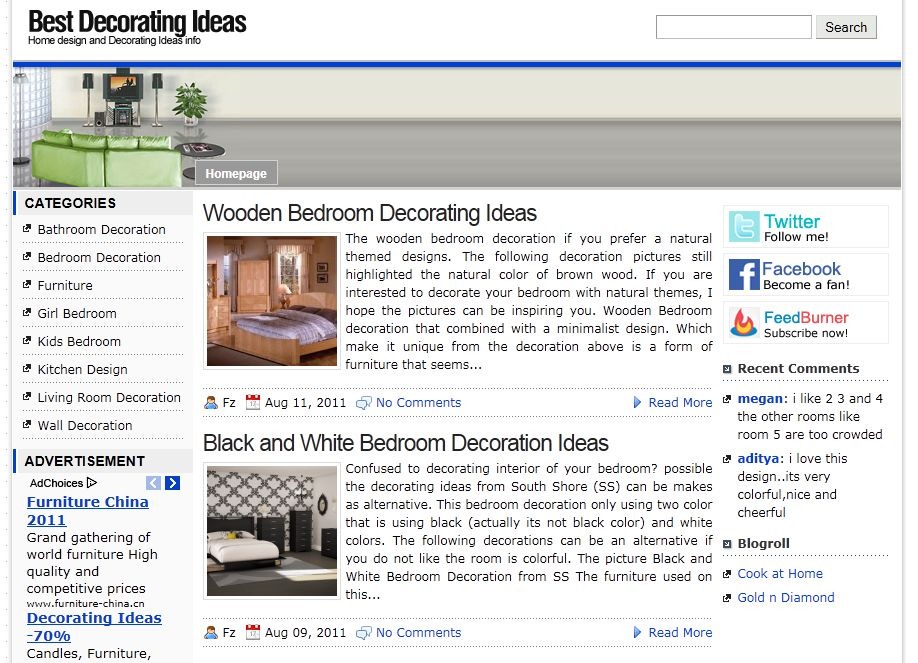

Decoration WP Theme Features

  1. Related Post with Thumbnail. This theme not requires related post plugin because the plugin has included in this themes. This related post is modification from related post that found in tricks theme.

    Related Post_thumb[2]
  2. Two share button style choices. You can select the share button style you want from them option.Share Style 1

    share-style-1_thumb[1]
  3. You can inserted advertisement code in single post without editiong theme. and other feature…


Actually this theme is not 100% premium WP theme because not all features in this theme is premium features.

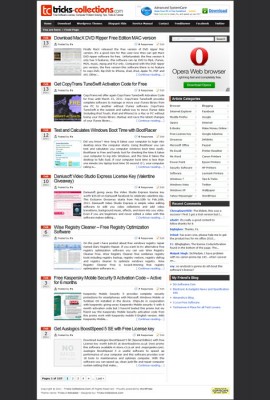

WordPress Theme Tricks 2 Reloaded Available for Download


Actually I created “Tricks 2 Reloaded theme” is for my other blog, but after I tested this theme on this blog many readers ask how to get this theme for their own blog.

Tricks-2-ReloadedTricks 2 Reloaded theme actually is not new version of tricks theme but this theme is modified version from Tricks 2 WordPress Theme but I have added a few features on this theme such as PageNavi ready, related post script and breadcrumb so if you install this theme in your blog you no need to install PageNavi, breadcrumb and related post plugin.

On this theme I also minify the CSS file, change a few icon, reduce image used and now in this theme version you can display category in two columns like this blog

Full Screenshot of WordPress Theme Tricks 2 Reloaded


Important File in This Themes


  • adsense-content1.php, you can paste your adsense or advertisement code in this file. The adsense will appear right after the title in single post.
  • adsense-content2.php, You can also paste you advertisement code in this file and the ads will appear in the bottom of single content
  • adsense-front.php, to display adsense/advertisement in the frontpage. The ads appear after first post
  • adsense-menu.php, You can change the code in this file to add adsense link but if you want to display “breadcrumb” don’t modify the code in this file.
  • banner.php, to display banner in the top right
Suggestion before Install This Theme in Your Blog (urgent to prevent error)
  1. Disable/delete WP-PageNavi Plugin if you install the plugin in your blog, the pagenavi has included in the Tricks 2 Reloaded Theme
  2. Disable related post plugin (optional but it recommended)
Note: You can use this theme for commercial or non commercial blog but not allow to remove the link in the footer

Download Template


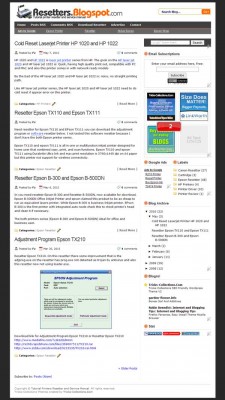
Tricks Theme V2 BlogSpot Version Available for Download

tricks-blogspot-version
After release Tricks themes V2 WordPress version,  Tricks collections theme V2 BlogSpot version now available for download.

Like the “tricks theme v2″ wordpress version, on blogspot version have almost the same features such as social bookmarking buttons, related post, favicon ready, etc and on the blogspot version also Adsense ready.

If you need a Adsense ready template for blogspot is you can download this template. I’ve embed adsense code on this template and you can replace with your Adsense code and this template also has two versions are with the logo and without logo.

How to Upload this template to blogspot:


  1. Login to blogspot Account
  2. Click “Layout” on the blog that will be replaced by this theme.
  3. Click “Edit HTML”. Select the template by clicking browse and click Upload.
Tips setting to show comment form on you blog if using this Template

Be make sure to setting your blogspot blog like the following tips to make this theme appear properly in your blog when installing this theme.
  1. Click “Setting” the select “comment” Tab
  2. On  “Comments” check show
  3. Select “Embedded below post“ on “Comment Form Placement”
  4. On “Show profile images on comments “ select no
  5. Save the setting
Tips Replace Adsense code on this template:
  1. Layout, edit HTML
  2. Check mark “Expand Widget Templates ”
  3. Replace Adsense code between “<div class=’topadsense’> and </div>”. Setting Color for this Adsense “background=#FFFFFF, link=#666666”
  4. Replace Adsense code between “<!– start adsense content top –> and <!– end adsense content top –>””
  5. You must parse the adsense code before inserted into the template.
Tips for template with Logo version template
  1. You can replace the Logo on this template by replacing path of logo on “h1.logo a”
Tips if Using 125x125px banner
  • Add Text/HTML gadget to the sidebar then create this DIV tag: “<div class=’sponsor’><div>” in the gadget
  • Copy 125×125 banner code betwen the TAG
Template without logo version: Download | View Demo
Template with logo version: Download |View Demo

Download link for newest version tricks 2 blogger skin: Tricks 2 blogspot skin logo version: download and nologo version: Link 
Download ada di akhir Posting 

What new in the new version?
  1. Fixed bug in blogger page, now in blogger page show full content.
  2. Category/Label automatic split into two column like newest version of tricks 2 theme WP version.
  3. Fixed thumbnail if no image displayed

Note : if you use old version, upgrade it to the newest version. If you use newest version please change the meta keyword and description in the tricks 2 blogger skin.


Mas Paper Template

Mas Paper Blogger Template


Edit Template
Find this code in Edit HTML :

<script src='http://johnytemplate.googlecode.com/files/tabber.js' type='text/javascript'/>
Change with this code :
<script src='https://masolis-javascript.googlecode.com/svn/trunk/tabber.js' type='text/javascript'/>
This code for related post
<script src='http://jamu-martin.googlecode.com/files/related-martin.js' type='text/javascript'/>
Change with this code :
<script src='https://masolis-javascript.googlecode.com/svn/trunk/relatedpost.js' type='text/javascript'/>
This code for page navigation
<script src='http://jamu-martin.googlecode.com/files/page%20navigation.js' type='text/javascript'/>
Replaces with this code :
<script src='https://masolis-javascript.googlecode.com/svn/trunk/page%20navigation.js' type='text/javascript'/>
This code :
<script src=' http://johnytemplate.googlecode.com/files/newsticker.js ' type='text/javascript'/>
Change with this code :
<script src=https://masolis-javascript.googlecode.com/svn/trunk/headline.js' type='text/javascript'/>
At last
<script src='http://jamu-martin.googlecode.com/files/label.js' type='text/javascript'/>
Replaces with this code :
<script src='https://masolis-javascript.googlecode.com/svn/trunk/label.js' type='text/javascript'/>


BlackZone Classic Style

BlackZone Classic Style


Social Institutions Template

Social Institutions Template 


Zona Maximum Dark Template


Feature on template


  1. Read More tanpa JavaScript, membuat template ini terkesan menarik untuk dilihat.
  2. Titel Tooltip Otomatis pada setiap link, memberikan kesan terindah dalam meanpilkan title link yang mengikuti mouse
  3. Recent Comments Simple, tidak  memperngaruhi loading blog (loanding blog)
  4. About The Author, menunjukkan sang author blog yang dilengkapi dengan modifikasi image (gambar) yang menarik.
  5. Archive, merupakan daftar isi blog yang sudah dirubah dengan sentuhan-sentuh CSS dan JavaScript yang mantap dan bisa di sort berdasarkan tanggal dan posting.
  6. Gallery, ini merupakan penjabaran dari daftar isi thumbnail yang diberikan oleh Kang Fathur sebelumnya.


Semoga template SEO Friendly ini dapat menjadikan anda terkenal dengan blog baru ini. Minimal template ini tersimpan dalam koleksi template anda.

Template Social Eyes

Template Blogger baru yang disebut Social Eyes. Mata sosial adalah warna biru 2 kolom Blogger Template yang terinspirasi sosial. Its siap untuk digunakan tanpa biaya untuk setiap pengguna blogger seperti biasa. Pertama, mari kita lihat demo:


Features of Social Eyes Blogger Template

Social Eyes Blogger Template have following features:

  1. 2 Column
  2. Socially inspired blue color
  3. Stylish transparent navigation menu and sub-menu
  4. Automatic read more with thumbnail for each post
  5. User friendly comment section
  6. SEO friendy
  7. 3 column footer widget


Template Flash News Blogger

 Download Templates for Blog >>> Template Flash News Blogger
 

Sport News

http://bejoartikel.blogspot.com/2012/11/callejon-madrid-tidak-beda-bedakan.html

Featured Content Slider

Trending Topik

Support : Creating Website | Johny Template | Mas Template
Copyright © 2011. ArtikelBejo™ - All Rights Reserved
Template Created by Creating Website Published by Mas Template
Proudly powered by Blogger